 Dockside
Shopify's built-in purchase orders or an app: which one fits your store
What the purchase orders inside the Shopify admin do, what they leave to you, and when a purchase order app like Dockside is worth adding.
Shopify has purchase orders built into the admin, at no extra cost. Dockside: Purchase Orders is our app, so read this knowing who wrote it. The short answer: if you place a few orders a month and already know what to buy, the built-in tool is enough. An app starts to pay for itself when deciding what to order is the slow part.
What the built-in purchase orders do
This is taken from Shopify's own help pages, read on November 17, 2026.
- A purchase order has a supplier, a destination location, products with quantity, the supplier's SKU, cost and tax, payment terms, the supplier's currency, a reference number, a note and tags.
- Costs are filled in from your previous order with that supplier, or from the product's cost per item.
- You can import the lines from a CSV file and export the order as a PDF.
- Receiving happens on a transfer linked to the order. You can receive part of a delivery, reject items and scan barcodes.
- Freight and other fees are added on the shipment, as cost adjustments.
That is a complete basic flow, and it is already in your admin under Products.
What it leaves to you
- Deciding what to order. Shopify's help pages describe no reorder suggestions, minimum stock levels or lead times for purchase orders. You pick each product and quantity.
- Supplier rules. There is no price list per supplier with case sizes, minimum quantities or a minimum order value.
- Two documents to keep in step. The order and its transfer are separate, and Shopify notes that changes to one do not update the other.
- Supplier defaults. Payment terms and currency are not saved on the supplier, so they are set on each order.
- Stock counts. Counting stock is a different part of the admin and is not tied to purchasing.
What Dockside adds
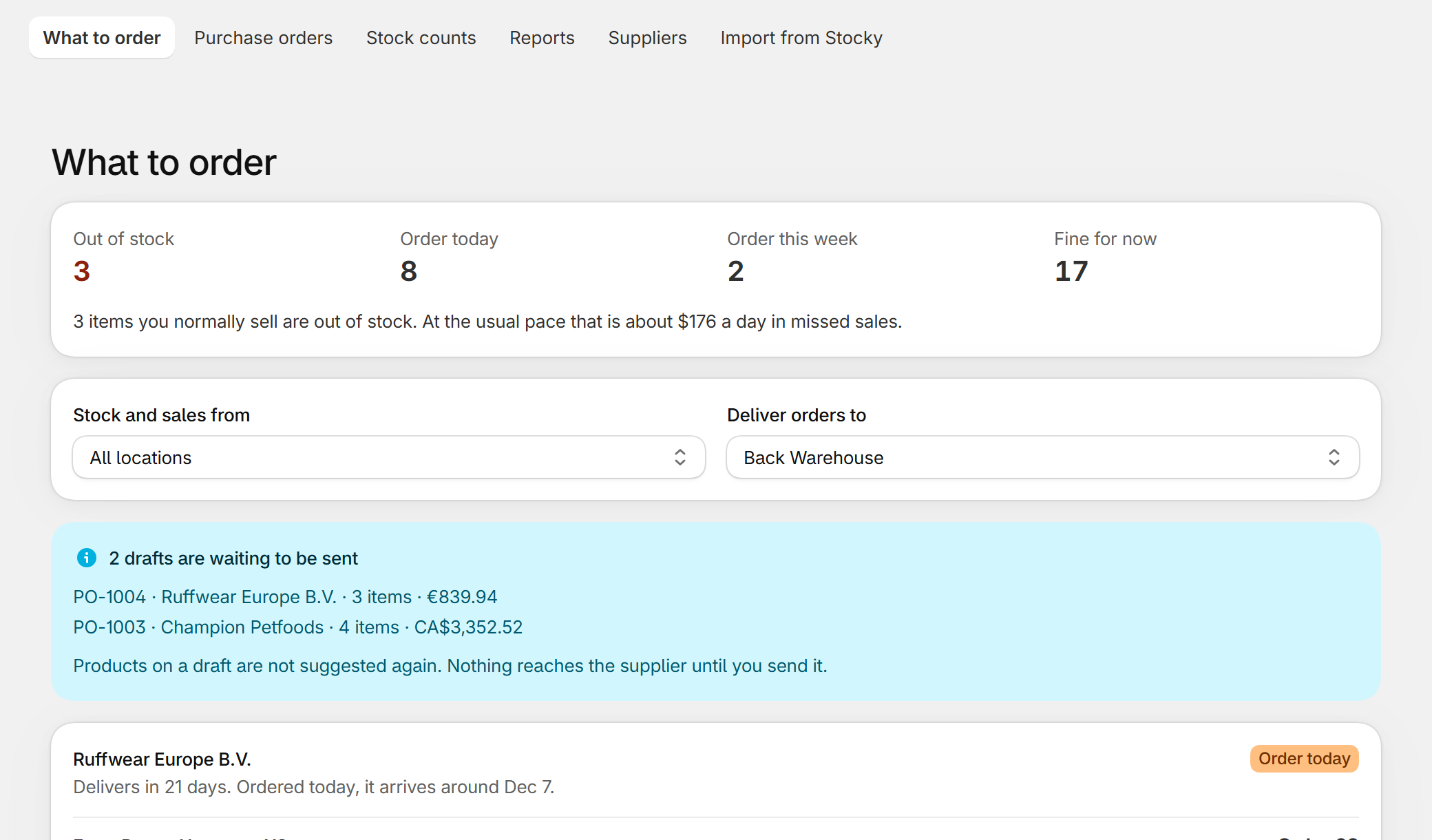
Dockside starts from the question the built-in tool skips: what should I order today? For each product it shows recent sales, stock on hand, units already on their way and the supplier's lead time, and the quantity that follows. The quantity is rounded to the supplier's case size and respects minimums. From there the order is one click, with costs from that supplier's price list.
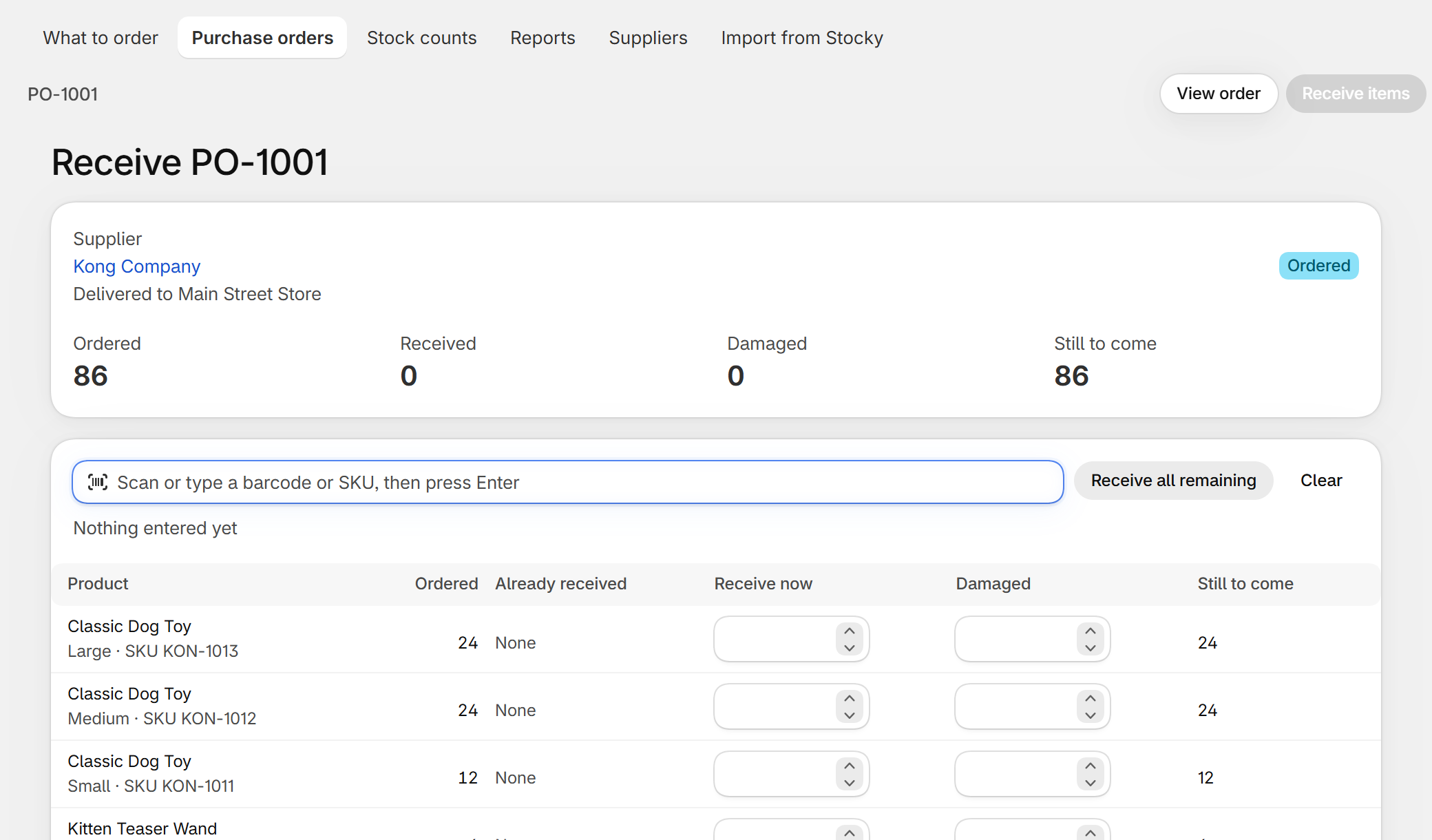
Receiving is on the order itself, not on a second document. Damaged units are written down on the receipt and stay out of your stock. If someone receives the wrong quantity, the receipt can be undone and the same units come back out of stock. Stock counts are in the same app and show each difference in units and in money before you apply it.
Side by side
| Shopify admin | Dockside | |
|---|---|---|
| Price | Included in your plan | Free for five new purchase orders a month, then $29 a month |
| Create and send a purchase order | Yes, PDF export | Yes, PDF download |
| Supplier currency, tax, freight | Yes | Yes |
| Import lines from CSV | Yes | Price lists from a spreadsheet |
| Partial receiving and barcode scanning | Yes, on the linked transfer | Yes, on the order |
| Damaged items on receipt | Yes, rejected on the transfer | Yes, counted as damaged and kept out of stock |
| Undo a receipt | Not described | Yes |
| Reorder suggestions | No | Yes |
| Case sizes and supplier minimums | No | Yes |
| Stock counts with value | Separate tool | Yes |
| Extra app to install and learn | No | Yes |
Where the built-in tool is the better choice
- You order from one or two suppliers and the quantities are obvious.
- You already move stock between locations with Shopify's transfers and want purchases in the same list.
- You would rather not add another app, or another bill, to the store.
Where an app is the better choice
- You have enough products that working out what is running low takes an afternoon.
- Your suppliers sell in cases or have minimum orders, and you keep rounding by hand.
- You came from Stocky and want your purchase history and supplier costs back. See how to import Stocky purchase orders.
Questions
Can I use both?
Yes. Both write to the same Shopify inventory. Keep each purchase order in one place, though, so a delivery is not received twice.
Do I need POS Pro for either?
No. That was a Stocky requirement. See the Stocky alternative guide for what changed when it closed.
Dockside: Purchase Orders — purchase orders, receiving, stock counts and reorder suggestions inside your Shopify admin. Free for five new purchase orders a month.
More guides
- Stocky alternativeStocky closed on August 31, 2026. What it did, what Shopify's own purchase orders cover, and how to keep ordering, receiving and counting stock without a spreadsheet.
- Import Stocky purchase ordersWhat the Stocky purchase order export contains, which columns matter, and how to turn that CSV into suppliers, supplier codes, case sizes and costs again.
- Purchase order template for Shopify storesThe fields a supplier needs on a purchase order, a plain template you can copy into a spreadsheet or an email, and the three ways to make one from a Shopify store.
- How to do a stocktake on ShopifyHow to count your stock and correct it in Shopify: what to prepare, the count step by step, what to check before you apply it, and the tools you can use.