 Dockside
Month-end inventory value on Shopify: how to get the number your accountant asks for
What the month-end inventory figure is, why it is hard to rebuild later, a five-minute routine for the last day of the month, and where to get it in Shopify.
At the end of a month, a quarter or a year, an accountant asks one question about your stock: what was it worth on the last day. The answer is the units on your shelves that day multiplied by what each one cost you. It goes on the balance sheet, and the change from one month to the next is part of your cost of goods sold. Dockside: Purchase Orders is our app, so read the part about it knowing who wrote it. Everything before that part works without it.
Why this number is hard to get afterwards
Shopify shows what is on the shelf now. Stock moves every day: sales, deliveries, returns, corrections. If you ask on the 9th what you had on the 31st, the honest way back is to undo nine days of movements one by one, at the cost each product had on the 31st, and costs may have changed since then too. Most stores that try it give up and send an estimate.
So the rule is simple: the month-end figure is taken on the day, or it is kept for you by something that takes it every day.
What the figure is made of
| Product | Units on the shelf | Cost per item | Value at cost |
|---|---|---|---|
| Mug | 120 | $4.60 | $552.00 |
| Lamp | 14 | $69.00 | $966.00 |
| Poster (no cost entered) | 30 | not counted | |
| Month end | 164 | $1,518.00 |
- At cost, not at price. Stock is valued at what you paid, not at what you sell it for.
- Cost means landed cost if you can. A cost without its share of freight and duty makes the stock look cheaper than it was. See how to split freight into the cost per item.
- Products without a cost count as zero. The poster above is on the shelf and is worth nothing in the total. Fill in Cost per item before the last day of the month, not after.
- Only what is yours and in your hands. Goods ordered and not yet arrived are usually left out. Ask your accountant about goods already paid for and still on the way.
- Place by place if you have more than one. A warehouse and a shop are two lines that add up to one total.
A five-minute routine for the last day of the month
- Finish what is half done. Receive the deliveries that arrived, and put returns back on the shelf or write them off.
- Look for products without a cost. Sort your products by cost and fill in the empty ones.
- Take the figure after the last sale of the day, or first thing the next morning before anything moves.
- Keep the list, not only the total. The total is one number. The list product by product is what lets you answer a question about it a year later.
- File it with the date in the name and send the total to whoever keeps your books.
If you count your stock once a year, do it close to the year end and before you take the figure. See how to do a stocktake on Shopify.
Where to get it
Shopify's own reports
Shopify's analytics include inventory reports, among them month-end ones. Open Analytics, then Reports, and look in the inventory group. Which reports you see and how far back they go depends on your plan, so check in your own admin. Check two more things there: whether the value is at cost, and whether products without a cost are left out of it.
An export and a spreadsheet
From Products, then Inventory, export the quantities on the last day. Add the cost of each variant from the product export, multiply and add up. It is free and it works. The weak point is that it only exists if somebody remembered to do it that day.
Dockside
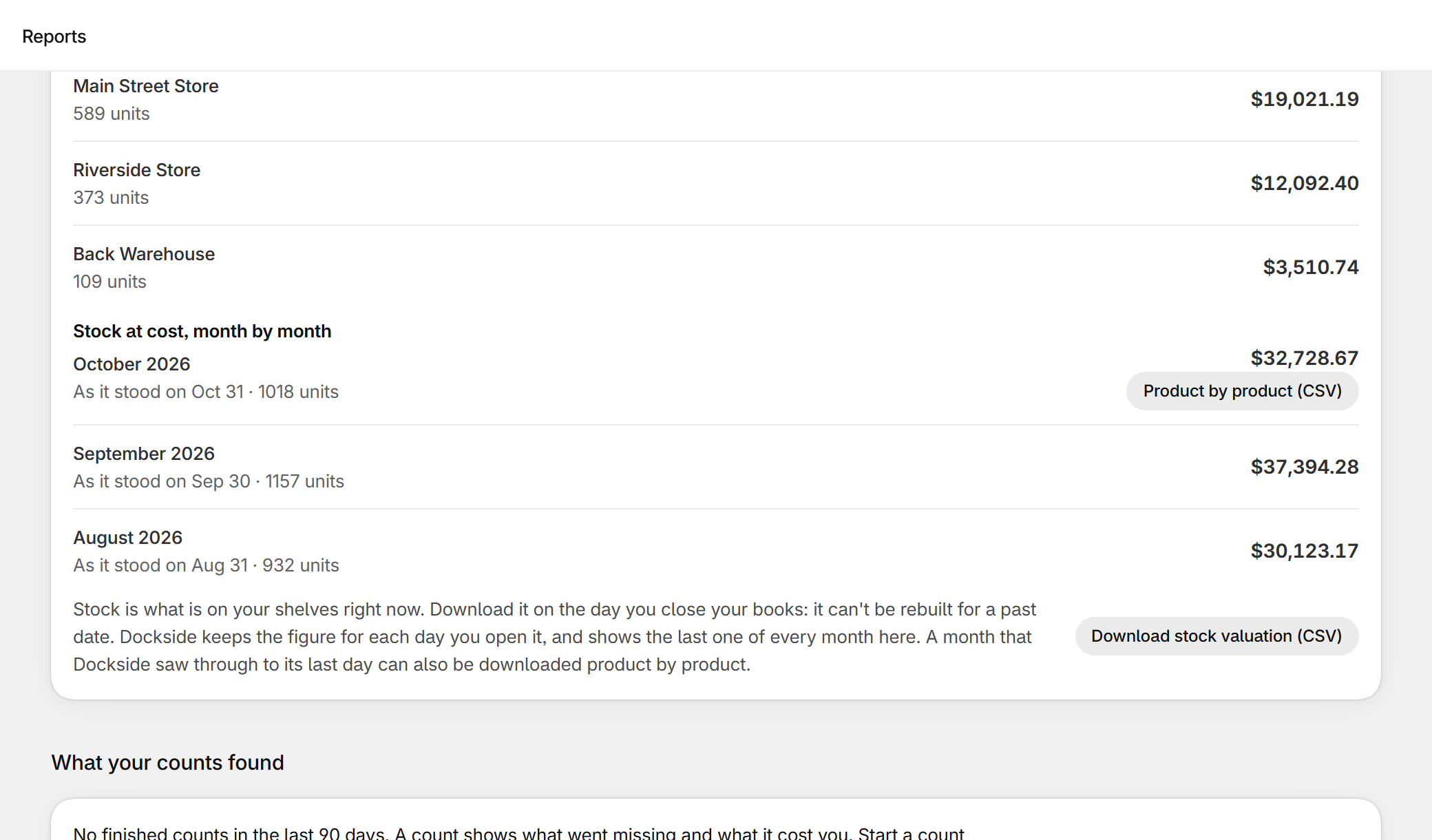
Dockside keeps the value of your stock at cost day by day, for every location. Reports shows today's figure place by place and the close of each month it has seen. A month that Dockside saw through to its last day can be downloaded product by product as a spreadsheet: location, product, variant, SKU, brand, units, unit cost and value, with a total on the last line that matches the figure on the page. Products without a cost are counted in units and named as not valued, so you can see how much is missing. Dockside starts keeping figures the day you install it. It cannot give you a month from before that. It is free for five new purchase orders a month, then $29 a month.
Questions
I forgot last month. Can I still get the number?
First look at Shopify's inventory reports for a month-end one that covers it. If there is none, start from today's stock and work back through the inventory history of each product. It is slow, and it uses today's costs unless you kept the old ones. Tell your accountant it is a reconstruction.
Which cost does the figure use if a cost changed during the month?
The cost on the day the figure is taken. That is one more reason to take it on the day. A figure worked out later picks up costs that were not true yet.
Is this the same as cost of goods sold?
No, but one leads to the other. Stock at the start of the month, plus what you bought, minus stock at the end, is the cost of what you sold.
I used Stocky for inventory reports. What now?
Stocky closed on August 31, 2026. See the Stocky alternative guide for what replaces each part of it.
Dockside: Purchase Orders — purchase orders, receiving, stock counts and reorder suggestions inside your Shopify admin. Free for five new purchase orders a month.
More guides
- Stocky alternativeStocky closed on August 31, 2026. What it did, what Shopify's own purchase orders cover, and how to keep ordering, receiving and counting stock without a spreadsheet.
- Import Stocky purchase ordersWhat the Stocky purchase order export contains, which columns matter, and how to turn that CSV into suppliers, supplier codes, case sizes and costs again.
- Shopify purchase orders vs DocksideWhat the purchase orders inside the Shopify admin do, what they leave to you, and when a purchase order app like Dockside is worth adding.
- Purchase order template for Shopify storesThe fields a supplier needs on a purchase order, a plain template you can copy into a spreadsheet or an email, and the three ways to make one from a Shopify store.